Sign Consent
Writing Clear Terms of Use and Privacy Policy for Your Warranty System.
Customizable Forms

Customize Your Warranty Terms and Privacy

Creating clear and comprehensive Terms of Use and a Privacy Policy is essential for any warranty registration system. These documents help users understand their rights, responsibilities, and how their personal data will be collected, used, and protected.
Why are Terms of Use and Privacy Policy important?

Before customers submit their product registration form, the system should display links to both the Terms of Use and Privacy Policy, along with a checkbox for users to consent before submission.
This consent step helps:
Build trust and transparency between your brand and customers.
Clarify what users can expect from the warranty service.
Protect your business from legal issues related to personal data handling.
Enhance the professionalism and completeness of your warranty system.
Both documents must be easy to understand, legally appropriate, and tailored to your specific business model to avoid future disputes and ensure compliance with data protection laws.

What should be included in the Terms of Use?

The Terms of Use describe what the customer agrees to when registering their product for warranty.
Key details to include:
• Warranty duration: e.g. 6 months, 1 year.
• Warranty coverage: Does the customer need to provide a receipt? What types of damage are covered (e.g. manufacturer defects only)?
• Exclusions: What’s not covered (e.g. accidental damage, misuse, unauthorized repairs or modifications)?
• How to claim the warranty: What channels should the customer use? What steps are required?
• Company limitations: In what cases can the company reject a warranty claim?
Example statements:
• This warranty covers only defects caused by the manufacturing process. Damage due to misuse, accidents, or unauthorized modifications is not covered.
• Customers must present proof of purchase, such as a receipt or registration number, when making a warranty claim.

What should be included in the Privacy Policy?

The Privacy Policy explains how customer information will be collected, stored, and used — giving customers confidence that their personal data is handled responsibly.
Key details to include:
• What data is collected: Full name, phone number, email address, product serial number, etc.
• Purpose of data collection: To verify identity, confirm warranty eligibility, and provide follow-up service if needed.
• Data security measures: Your company stores the data securely and does not share it with third parties without permission.
• Customer rights: Customers have the right to request access to, correct, or delete their data.
• Contact information: Provide a contact method for inquiries related to data protection or privacy rights.
Example statements:
• The information you provide will be used to verify your warranty eligibility and to contact you in case of any product issues. Your data will be stored securely and will not be shared with third parties without your consent.
• We only collect personal data that is necessary for processing your warranty registration. For example:
- Full name: Used to identify the registrant.
- Phone number: For follow-up or issue resolution.
- Product details: To verify the specific product covered by the warranty.

Using the Text Editor

Our system includes a built-in Text Editor that allows you to write your Terms of Use and Privacy Policy easily and flexibly without needing to write any HTML code.
Text Editor

What is a Text Editor?

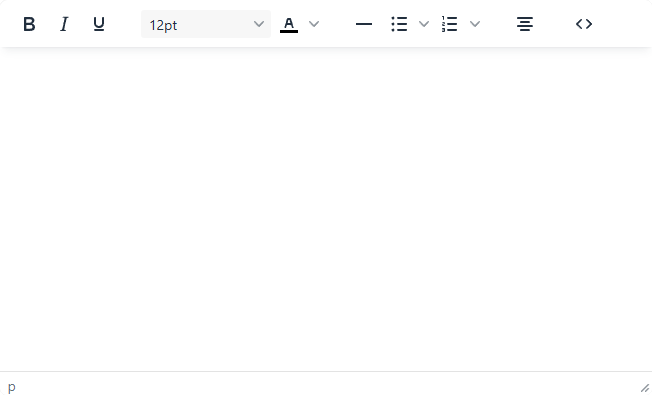
A Text Editor is a content field where you can type and format text such as bold, italic, bullet points, and more — similar to Microsoft Word. It helps you present your content in a clean and professional format without requiring any technical skills.


Supported Features

• Bold, Italic, Underline
Bold, Italic, Underline
• Font size and color settings
Font size
• Bullet and numbered lists
Bullet
• Horizontal line insertion
Horizontal Line
• Text alignment "Center"
Text alignment
• View and edit source code
Source Code

Important Usage Tips

Text Editor
Avoid pasting directly from word processing programs or websites
Programs like Google Docs, Word, or other editors often include hidden formatting codes that may cause display issues or unexpected layout problems.
Use “Paste as plain text”
The simplest way, paste your content into a plain text editor (like Notepad or TextEdit), then copy and paste it into the system. This will help remove any hidden styles or unnecessary code.
Avoid inserting scripts or unsafe HTML code
While the system has basic filtering for safety, we recommend sticking to simple text formatting for best results.